Designers Now Juggle 7 AI Tools, Up From 3. Is AI Making Design Harder?
AI was supposed to simplify design. Instead, the average designer's toolkit more than doubled in a year.
By Muhammad Anzal · 4 min read
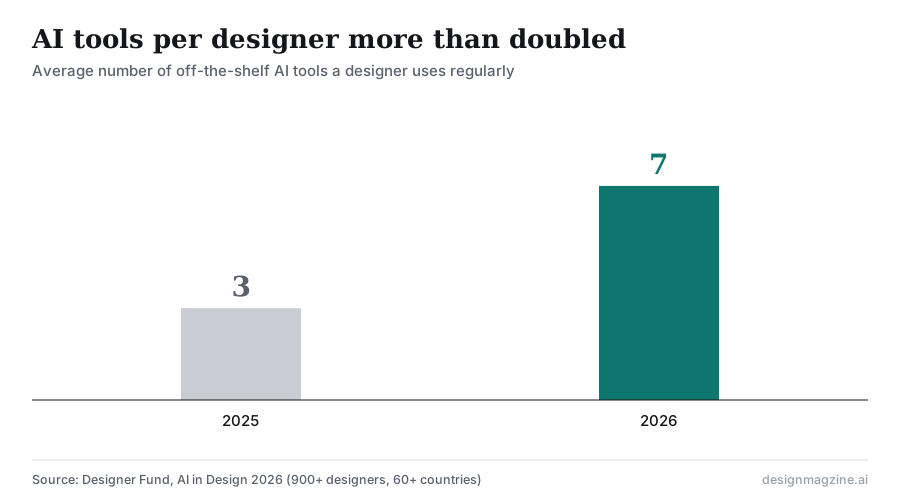
A year ago, the average designer regularly used three AI tools. Today it is seven. That is the finding from Designer Fund's AI in Design 2026 report, and it raises a question few people in the industry want to ask out loud: if AI is supposed to make design easier, why does the toolkit keep getting more complicated?
Seven tools, one top complaint
The survey of more than 900 designers found AI use is now nearly universal: 91 percent use it weekly and 75 percent daily. But when asked about their biggest challenge, designers did not name cost or access. They named unreliable output quality.
Those two findings are probably connected, though the report does not link them directly. When no single tool gives consistently good results, people add another one. One tool for images, another for copy, another for layouts, one more for code, another for upscaling. Each fills a gap the others leave. The result is seven logins, seven pricing plans and seven different ways of writing a prompt.
Adobe found the same pattern among creators. In its Creators' Toolkit survey of more than 16,000 creators across eight countries, run with The Harris Poll, 86 percent use creative generative AI and 60 percent used more than one generative AI tool in the past three months. When asked what holds them back, 34 percent named unreliable output quality and 38 percent named cost. Figma's 2025 AI report found that only 32 percent of designers and developers say they can rely on AI output.
Seventy-three percent of designers also told the survey they feel rising expectations around output, quality and speed. Faster tools did not lower the bar. They raised it.
The platforms are racing to be the one tool
The big design companies clearly see the same problem, because most of 2026's launches were attempts to pull scattered AI work back into one place.
- Adobe now hosts more than 30 AI models inside Firefly, including models from Google, OpenAI, Runway and others, so designers can switch models without switching apps. Its AI Assistant went into public beta across Photoshop, Illustrator, InDesign, Premiere and Frame.io in June.
- Canva launched Canva AI 2.0 on April 16 with agentic orchestration, which it describes as the AI choosing and coordinating the right tools to complete a goal.
- Figma added Weave AI image tools, Figma Motion and its agent at Config 2026, covering jobs designers previously handled in separate apps.
Each company is making the same bet: designers are tired of stitching tools together and will consolidate if one platform covers enough of the work.
Is AI making design harder?
For professionals, it is making design different more than harder. The individual tasks are faster. The overhead around them grew. Choosing tools, checking output and keeping a consistent look across several AI systems are now real parts of the job.
For people who are not designers, the answer may be the opposite. A small business owner does not want seven tools. They want one place to describe what they need and leave with finished files. That is the model behind small-business platforms such as Design.com, where you type a request with your business name and industry, choose from AI-matched templates, adjust the result by chatting with an AI editor, and download print-ready files in formats like SVG, PDF, PNG or MP4. Logos, social posts, flyers and business cards sit in the same workspace. For this user, fewer tools is the whole point.
What to do about your own stack
- List every AI tool you pay for. Note what each does that the others cannot. If the answer is "nothing," cancel it.
- Pick a home base. Use one main platform for finished work and keep specialist tools for specific jobs only.
- Standardize outputs. Agree on file formats and where final files live, so work from seven tools does not end up in seven places.
The jump from three tools to seven tells us AI is still in its sprawl phase. History suggests consolidation comes next. The open question is which platforms designers will be willing to settle on.
Frequently asked questions
How many AI tools do designers use?
Designer Fund's AI in Design 2026 report found the average designer regularly uses seven off-the-shelf AI tools, up from three the previous year.
What is the biggest problem designers have with AI?
Unreliable output quality is the most common AI challenge designers named in the 2026 Designer Fund survey.
Are design platforms consolidating AI tools?
Yes. In 2026 Adobe brought more than 30 models into Firefly and launched an AI Assistant across its apps, Canva launched Canva AI 2.0 with agentic orchestration, and Figma added image, motion and agent tools.