Adobe Now Runs 30+ AI Models, Including OpenAI's. Is the Era of One AI Tool Over?
Adobe's model picker now includes its biggest AI rivals. We counted who is in it and what that changes.
By Muhammad Anzal · 4 min read
Open the model picker in Adobe Firefly today and you will find something that would have sounded strange two years ago: image models from OpenAI, video models from Google and Runway, and models from Chinese companies Kuaishou and ByteDance, all sitting next to Adobe's own. On April 15, 2026, Adobe said Firefly offers more than 30 models.
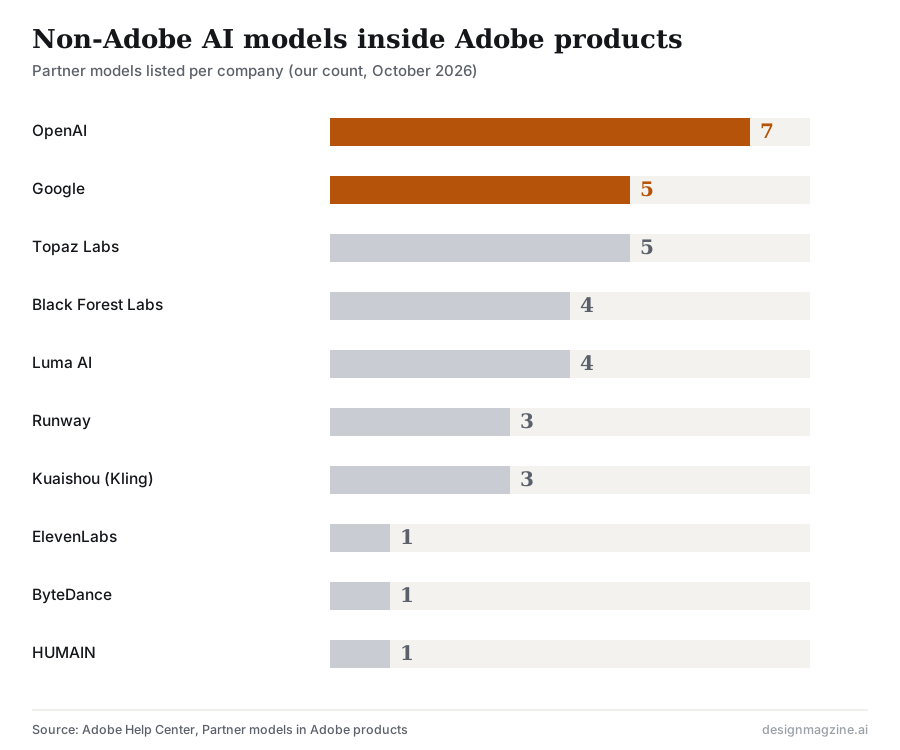
By our count of Adobe's partner models help page in October 2026, 34 non-Adobe models from ten companies are listed. OpenAI has the most, with seven.
Who is inside Adobe now
Adobe's help page lists partner models from Google (including Gemini with Nano Banana Pro, Nano Banana 2 and Veo 3.1), OpenAI (several GPT Image models), Black Forest Labs (FLUX), Luma AI (Ray), Runway (Gen-4, Gen-4.5 and Aleph 2.0), Topaz Labs (upscaling and enhancement), ElevenLabs (voice), Kuaishou (Kling 3.0 and Kling 3.0 Omni), ByteDance (Dreamina Seedance 2.0) and HUMAIN.
Some come with conditions. Kling 3.0, Kling 3.0 Omni and Seedance 2.0 are limited to individual plans, and Adobe discloses that using them sends prompts and reference files to the Chinese companies that built them. Availability of all partner models varies by country and region.
Why Adobe would host its competitors
A few years ago, the race in AI design was about who had the best model. Adobe's move says that race may not matter as much as everyone assumed.
- Models are leapfrogging each other. No single model stays best at everything for long. Hosting many means Adobe users always have access to whichever is strongest this month.
- The workflow is the moat. Designers keep their files, layers, brand assets and exports in Adobe. If the best model is available inside that workflow, there is less reason to leave.
- Standalone apps are vulnerable. OpenAI shut down its Sora video app this year, with the app closing on April 26, 2026. Yet OpenAI's image models remain available inside Adobe. The model survived. The standalone app did not.
Adobe's own research shows why that fine print matters to its users. In its Future of Creative Work study from June 2026, 70.5 percent of U.S. creative professionals and 74.9 percent of U.K. professionals agreed that AI models should not be trained on artists' work without consent, and 56.7 percent of U.K. professionals said they worry about copyright or trademark infringement from AI outputs. A menu of 34 models from ten companies gives creatives more choice, and more terms to check.
Is the era of one AI tool over?
For professionals, it mostly is. Designer Fund's AI in Design 2026 report found the average designer now uses seven AI tools, up from three. Adobe's answer is to bring many of those models into one place, and in June it went further, saying its tools are available inside ChatGPT, Claude and Microsoft 365 Copilot, with Gemini and Slack planned.
But "many models" is not the only way to solve the problem. For people who are not designers, the better answer is often one focused tool that hides the model choice entirely. Small-business platforms like Design.com take that route: you describe what you need with your business name and industry, choose from AI-matched templates, refine the design through an AI chat editor and download the files. The user never picks a model, and Design.com says its AI is trained on copyright-safe material, which removes one of the licensing questions that a 34-model menu raises.
So the era of one AI model is over. The era of one place to work is just starting, and it will look different for a professional designer and a bakery owner.
What this means for you
- If you use Adobe: treat the model picker like a brush set. Test a few models on the same task, and check the terms of any partner model before using it for client work.
- If you manage a team: decide which partner models are approved for commercial projects, especially those with data-routing disclosures.
- If you are not a designer: you do not need 34 models. You need a tool that gives you usable files and clear rights.
Frequently asked questions
Which AI models are in Adobe Firefly?
Besides Adobe's own models, Adobe products list partner models from Google, OpenAI, Black Forest Labs, Luma AI, Runway, Topaz Labs, ElevenLabs, Kuaishou, ByteDance and HUMAIN. Availability varies by country and plan.
How many AI models does Adobe Firefly offer?
Adobe said on April 15, 2026 that Firefly offers more than 30 models. By our count of Adobe's partner models help page in October 2026, 34 non-Adobe models from ten companies are listed.
Does Adobe train AI on my content?
Adobe states that user content is never used to train partner models or Adobe's own models, and that partner model developers must contractually agree to this.