Best Free Logo Makers in 2026: What You Can Actually Download for $0
We tested free logo makers to the download step: which let you generate without an account, which add watermarks, and where the paywall sits.
By Editorial Team · Updated · 13 min read
I gave the same logo brief to every tool on this list and then did something most roundups skip: I walked each one to the download button. The brief was for a fictional neighbourhood bike repair shop, Tern Cycle Works: a mark that combines a bicycle wheel with a tern bird, navy and signal orange, flat colour, readable at small sizes, no tagline.
Four tools made me a logo before asking who I was. Four others stopped me with a sign-in box the moment I pressed Generate. One needed no prompt at all but hid the finished image behind a subscription. The difference between those outcomes matters more than any feature list, because a logo you cannot download is just a screenshot.
This guide ranks free logo makers by what you can leave with, not by what the landing page promises. Where I could not complete a step, I say so and label the claim as the vendor's own.
How I tested (and what “free” means here)
I tested between 22 and 29 October 2026 using a standard desktop browser and free accounts. I never entered payment details, never created an account, and never bought anything. Where a tool already had a signed-in free account in my session, I used it; where it did not, I stopped at the sign-up wall and recorded that.
“Free” is not one thing. I scored each tool at four checkpoints:
- Generate: can you get a logo without making an account?
- Edit: can you change colours, text and layout without paying?
- Download: is the free file clean, or watermarked or blurred?
- Use: do the terms allow commercial use, and is a vector file included?
| Checkpoint | What I looked for | Where tools failed |
|---|---|---|
| Generate | Logo appears after typing a brief | Sign-in modal before any result |
| Edit | Change text, colour, layout at no cost | AI edits capped; editor behind sign-up |
| Download | File without watermark or blur | Watermarked PNG; paid checkout |
| Use | Commercial terms and SVG/EPS/PDF | No licence stated; vector sold separately |
Limits of this test: I could not operate NoteGPT, LogoDesign.net, LogoMaster, CapCut or the Logo Diffusion app in my test browser, so those entries rely on each vendor’s own pages and are marked as vendor claims. I did not click Download on the free tools, so I report what each download screen showed, not the final file. The mouse pointer was retouched out of two result screenshots; nothing else was altered.
What happened when I pressed Generate
Design.com came out best in this test, so it goes first. It offers two routes, an AI prompt or templates, and an AI chat box for edits afterwards. Here is the logo grid it produced from the Tern Cycle Works name:
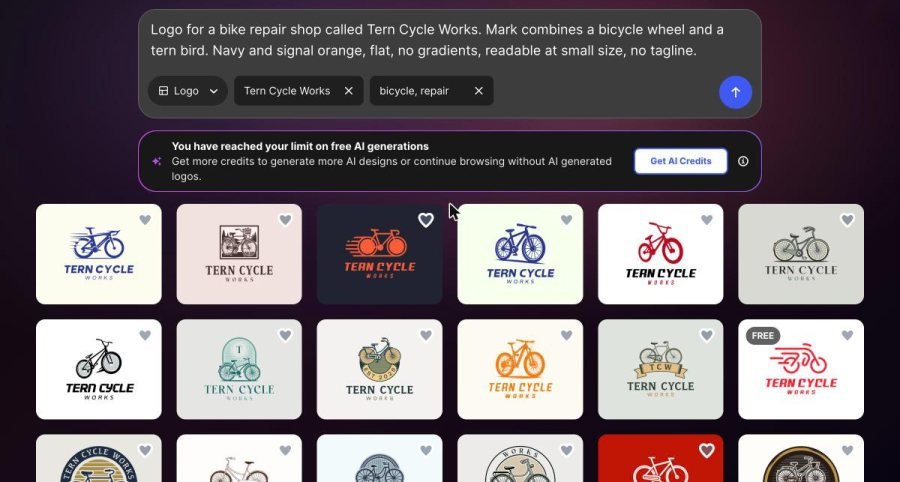
This is the most useful table in the article. It shows who lets you try before you register.
| Tool | Generated without an account? | What happened |
|---|---|---|
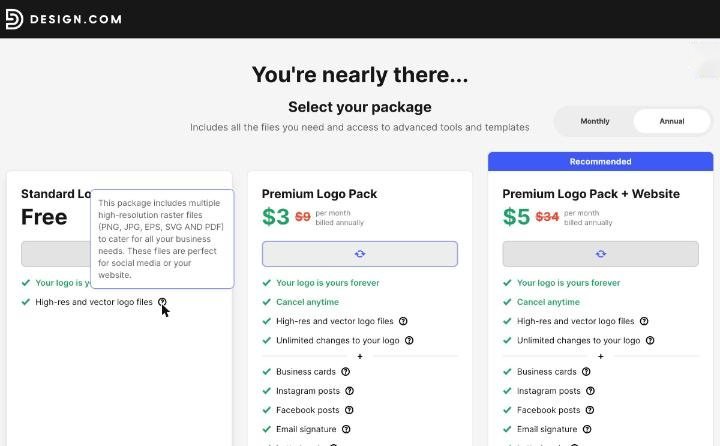
| Design.com | Yes (templates); AI route has a free-generation cap | Typed the name and about 18 bicycle logos appeared on templates at once; one tagged FREE with a Standard Logo Pack at $0 (PNG, JPG, EPS, SVG, PDF listed). Best result of the set |
| Readdy | Yes | Logo in about 15 seconds; “Download PNG” button shown |
| DeepAI | Yes (default HD model) | Logo in about 20 seconds; larger models locked |
| Fotor | Yes | Logo in about 40 seconds; Download button shown |
| Template.net | Yes | Logo in about 50 seconds; free PNG watermarked |
| Kapwing | No | “Sign in to continue” on submit |
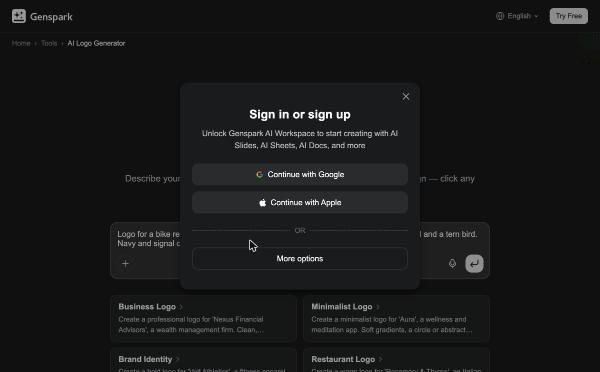
| Genspark | No | “Sign in or sign up” on submit |
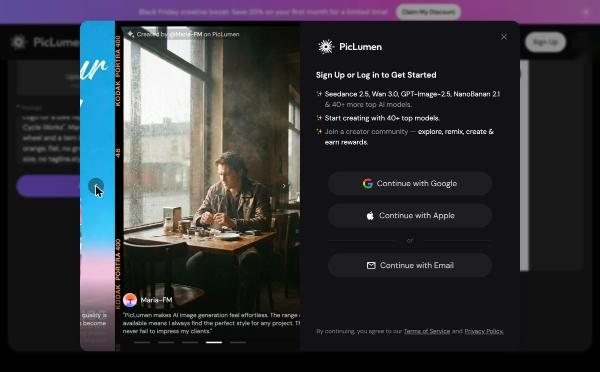
| PicLumen | No | “Sign Up or Log in to Get Started” on Generate |
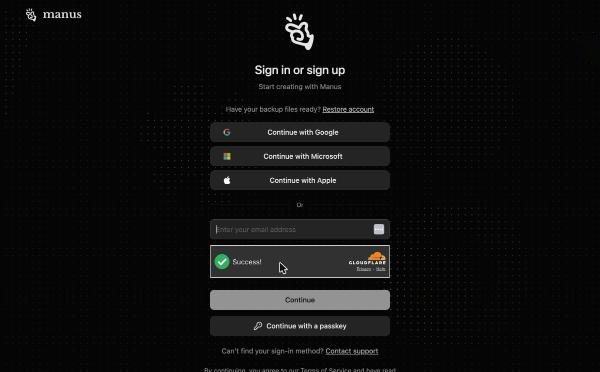
| Manus | No | Redirected to a login page on submit |
| ChatGet | Partly | Three-step questionnaire, then redirected to an account modal; no free-text prompt |
Here is what the four other open tools produced from the identical brief (Design.com’s grid is above):
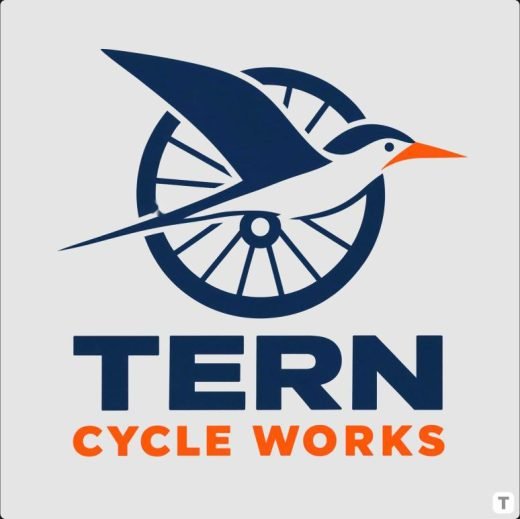
None of these is finished. Each would need a designer’s eye on spacing and a check that the bird reads as a tern at 32 pixels. But as free first drafts they differ more than you would expect, and that difference is the reason to try two or three before choosing.
The ranking: best free logo makers by what you can leave with
I ranked on the four checkpoints, weighting the download step most. A tool that generates beautifully but charges at the end ranks below one that produces a rougher file you can actually use.
Best overall · Free pack on FREE templates
Design.com
Design.com gives you two routes to a logo. Route one is the AI prompt: describe the brand and it generates options. Route two is templates: type your name and the same name appears on dozens of layouts at once. On 29 October I typed the Tern Cycle Works brief and the template grid filled with about eighteen bicycle logos carrying the right name, one of them tagged FREE (my free AI generations on that account were already used up, and the page said so, then let me carry on with templates).
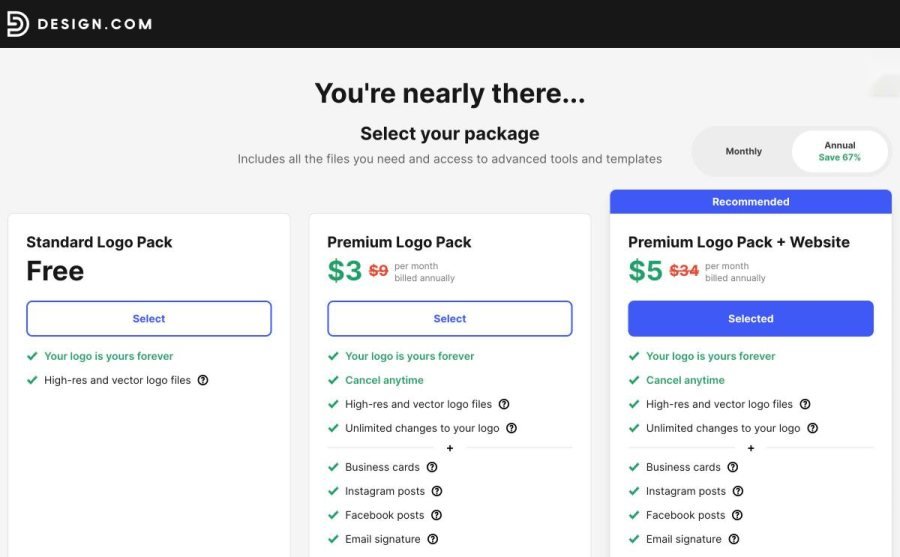
I opened the FREE template in the editor, which has Text, Layout, Background, Logo, Shape, Animate and AI panels plus an AI chat box that asks what changes you would like. Pressing Download led to a package page whose first option is the Standard Logo Pack, Free: “Your logo is yours forever”, with a tooltip listing PNG, JPG, EPS, SVG and PDF files, and an order summary reading “Free License, Total: Free”. I stopped before pressing Continue, so I have not opened the downloaded files or read the licence in full. Paid packs ($3 and $5 a month billed annually, struck-through from $9 and $34) add unlimited changes and brand extras such as business cards and social posts. AI-generated logos I tested on 22–23 October led to the paid tiers at checkout.
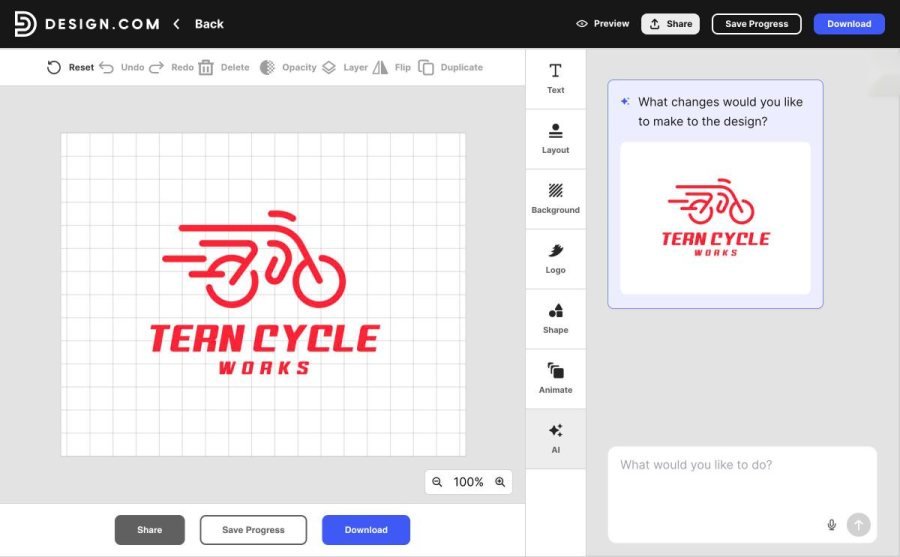
Worked
- Two creation routes
- Free pack with vector formats on FREE templates
- Live-text editor
- AI chat edits
Caught me out
- Only FREE-tagged templates are $0
- Free AI generations run out
- Read the free licence terms before use
Best no-account draft
Readdy
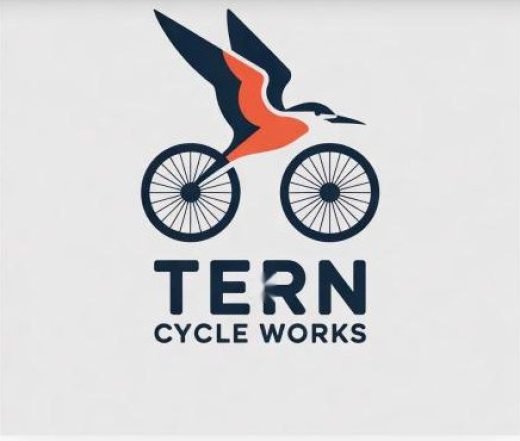
Readdy asked for a description, a company name and one of four logo types (icon, wordmark, combination or emblem). The combination result put a navy tern in flight over a spoked bicycle, with the name spelled correctly. The only export button is “Download PNG”; I did not click it, so I cannot confirm the file is unwatermarked. The page describes the tool as free to preview and does not state licence terms.
Worked
- No sign-in
- Fast
- Follows the brief closely
Caught me out
- PNG only
- No editor
- Licence terms unstated
Best for a quick draft
Fotor
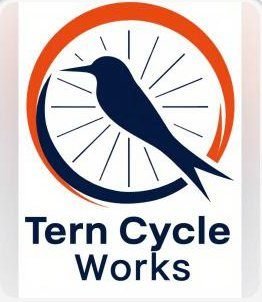
Fotor generated a wheel-and-bird mark in an orange and navy ring with no account. The bird looks more like a kingfisher than a tern, and the name wrapped onto two lines. Fotor’s page says templates download with no watermark in JPG, PNG or PDF; I did not test that for AI output, and the page does not mention SVG.
Worked
- No sign-in
- Rich composition
- Editor exists on the site
Caught me out
- Download terms for AI output unverified
- No SVG mentioned
Best for zero friction
DeepAI
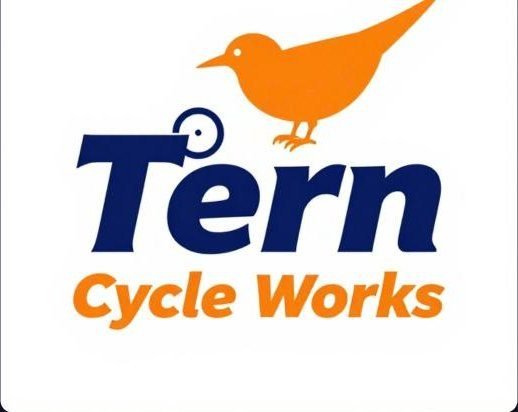
DeepAI generated with no account on its default model, and the lettering was clean. But its image reads more like a wordmark with a bird sticker than a combined mark, and the page runs a sponsored banner. DeepAI’s page says commercial use is permitted and that generated images are treated as public domain, which means you could not stop a competitor copying your design.
Worked
- No sign-in
- Correct spelling
- Paid tiers priced per image
Caught me out
- Raster only
- Public-domain stance weakens exclusivity
Best-looking free result · Watermark on free PNG
Template.net
Template.net produced the strongest composition in the test and needed no sign-in. But the download panel offered “Basic Quality” (free) with a watermark, or “High Quality” for 20 credits with no watermark, plus an upsell to 1,450 credits a month for $11. The file-type list showed JPG, PNG, PDF, transparent PNG, favicon, WEBP, BMP and TIFF, with no SVG, even though the landing page lists SVG.
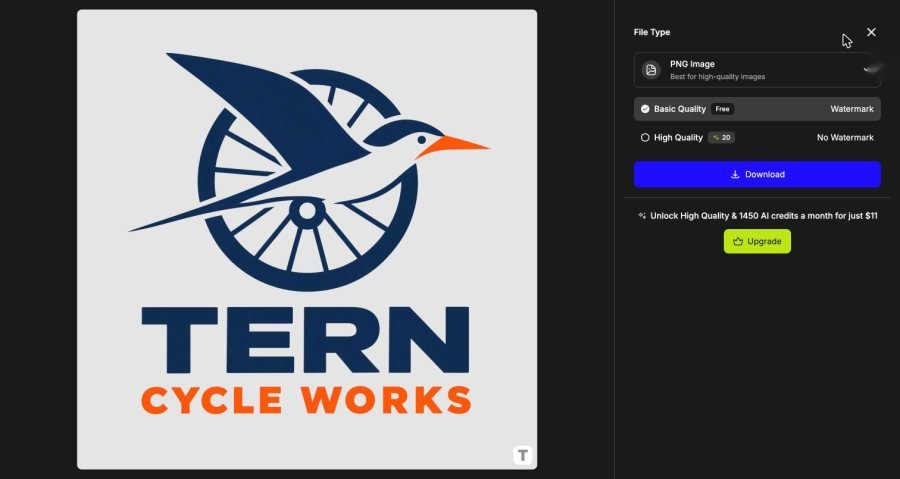
Worked
- Best artwork
- No account to generate
- Many raster formats
Caught me out
- Free PNG watermarked
- SVG claim not matched by the menu
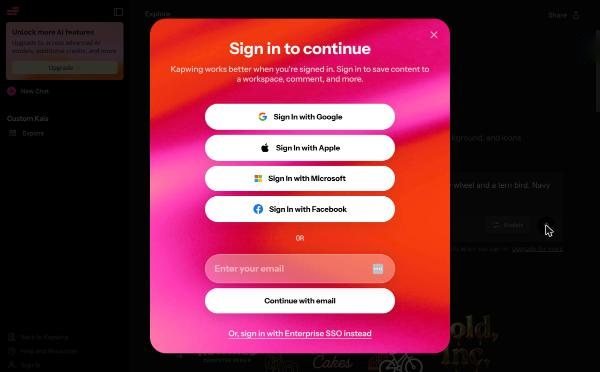
Tools that need an account first. Kapwing, Genspark, PicLumen and Manus all stopped me at sign-in. Kapwing’s page promises “full commercial rights, no watermark” and says free credits come with sign-in. Genspark says it exports PNG, layered PSD and PDF, with no SVG. PicLumen advertises 10 free credits a day. Manus lists a small free allowance and ties final downloads to paid plans. I could not verify any of this beyond the wall.
Tools I could not complete. Logo Diffusion’s page lists a free plan of 24 credits a month, with watermarked 512×512 downloads and no commercial rights, and sells SVG and transparent PNG on paid plans. LogoMaster and LogoDesign.net both say they are free to design and charge to download; LogoDesign.net quotes “starting at just $37”. All are vendor claims.
Side-by-side comparison
| Tool | No account to generate | Free download state | Vector format |
|---|---|---|---|
| Design.com | Account for full flow | FREE templates: Free pack at checkout; AI logos: paid | SVG/EPS/PDF in the free pack tooltip |
| BrandCrowd | Account to edit | Paid checkout (same $3/$4/$5) | Listed on page |
| Readdy | Yes | PNG button; watermark unverified | No |
| Fotor | Yes | Unverified for AI output | Not mentioned |
| DeepAI | Yes | Unverified | No |
| Template.net | Yes | Free = watermark | Not in menu |
| Kapwing | No | Claims no watermark | SVG claimed |
| Dreamina | No (sign-in modal) | Free downloads watermarked per plans page | No |
| Canva | Account used | SVG and transparent PNG need Pro | SVG = Pro |
| Wix (Wixel) | No (sign-up page) | PNG default; vectorize for SVG | After vectorize |
| Logo Diffusion | Claims yes | Free = watermarked 512px | Paid |
Three kinds of “free” and why they matter
After a week of this, I stopped thinking of “free logo maker” as one category. There are three business models hiding under the phrase, and each one fails you in a different place.
1. Free to generate, paid to keep
BrandCrowd, LogoMaster and LogoDesign.net follow this pattern, according to their pages and my own checkout walk-through for the first. Design.com is the partial exception: its AI logos led to paid tiers in my tests, but FREE-tagged templates led to a $0 pack. The design stage costs nothing, the preview is watermarked, and the transaction happens when you press download. This is the most honest model for people who want a finished file, because the price is visible before you commit. It is the worst for people who wanted to spend nothing at all.
2. Credit-metered generation
Template.net, Dreamina, Kapwing, PicLumen, Wix, Logo Diffusion, DeepAI Pro and NoteGPT all meter usage in credits or daily allowances. Every generation or edit burns some. On Wix’s Wixel in my earlier session, one generation plus one revision used about 22 of 30 free credits. On Dreamina, one image on the cheaper model cost 2 credits, and the premium model triggered a paywall. This model suits people who iterate a little, then stop. It punishes people who iterate a lot, because the revisions that make a logo good are the ones that cost credits.
3. Free draft, paid file
ChatGet’s free tier shows a blurred preview and sells the unblurred file through a Pro subscription; its page lists a first-week price followed by a monthly rate that auto-renews. Template.net’s watermark sits in this group too. Here the free part is the idea, not the asset. Treat it as a mood board.
Seeing the model before you invest time saves you an evening. If you want to refine a logo through many rounds, avoid credit-metered tools on free plans. If you want to spend nothing, treat the output as a sketch and plan to rebuild it.
What most “best free logo maker” roundups skip
Reading the pages that rank for this topic, I noticed the same four gaps, and each one cost me time during testing.
- They list features, not friction. A feature table says “SVG export”. It rarely says that the export sits on a plan that starts at a monthly fee, or that the menu I opened lacked it.
- They rarely say when they tested. Free tiers change monthly. Dreamina’s page now warns not to assume every free output is watermark-free; a year-old review would not know that.
- They treat licences as an afterthought. A tool can let you download a PNG and still not give you exclusive rights, or any commercial rights on the free tier.
- They do not show failures. Misspelled names, ignored instructions and gibberish taglines happened in my own tests; they are normal, not rare.
The fix is dull but it works: write down the date, the plan, and the exact download options you were shown. That is what the tables above do.
A ten-minute checklist before you trust any free logo
- Spell-check every word in the logo, then read it backwards.
- Open the download screen first. Note formats, price and watermark rules before you refine.
- Shrink to 32 pixels. A favicon is the toughest test a logo faces.
- Convert to one colour. If it fails in black on white, it will fail on a stamp.
- Reverse-image search the mark. AI tools can drift toward familiar shapes; make sure yours is not someone else’s.
- Save the terms page. Screenshot or save a PDF of the licence on the day you download.
- Ask for a vector. If you need signage, embroidery or print, a raster logo will need to be rebuilt by hand anyway.
That list takes ten minutes and will save you from the two most common regrets: paying twice, and reprinting.
Which free logo maker should you pick?
Match the tool to the job, not the ranking:
- You need an idea in five minutes, no account: Readdy, then Fotor. Compare both; they reached different compositions from the same words.
- You want to finish and own a clean file: Design.com first. Pick a FREE-tagged template for the $0 pack, or an AI logo and plan for the $3–$5 monthly-equivalent checkout, billed annually. BrandCrowd follows the same paid structure.
- You need an SVG: Design.com’s free pack lists SVG, EPS and PDF files for FREE-tagged templates (confirmed on its checkout page, not yet opened as a download). Logo Diffusion and Kapwing list vector export on paid or signed-in plans.
- You want something unusual to riff on: Template.net, accepting that the free PNG is a watermarked reference image.
- You are making a brand you cannot afford to have copied: avoid tools that call outputs public domain (DeepAI) and read the licence of every other one.
If a logo will sit on a van, a sign or a shopfront, a free PNG is not enough: you need a high-resolution or vector file. Budget for that, or use a free draft as a brief for a designer.
Five mistakes free-logo users make
- Falling for the preview. A watermarked preview looks finished. The clean version is the paid one.
- Ignoring spelling. In my earlier sessions, Canva rendered one test name as “AIDER” and Adobe Express produced gibberish taglines. Read every letter.
- Skipping the small-size test. Shrink the logo to 32 pixels. If the bird becomes a blob, simplify.
- Assuming “commercial use” means “exclusive”. A licence to use a logo is not the same as being the only user.
- Skipping the colour check. Does it still work in one colour on a dark background?
Verdict
Most free logo makers are excellent at one thing: producing a draft quickly. They are inconsistent at the thing you actually need, which is a clean file you can use. Design.com is the one that connects both ends: two ways to create, an AI chat editor to refine, and a $0 pack with vector formats on FREE-tagged templates. Readdy, Fotor and DeepAI are good for no-account drafts. Whatever you choose, open the download screen first, note the price, then decide.
I will re-run this test when any of these tools changes its free tier.
FAQ
What is the best free logo maker in 2026?
Design.com. It has two creation routes (AI prompt and templates), an AI chat editor, and a $0 Standard Logo Pack with PNG, JPG, EPS, SVG and PDF files on FREE-tagged templates. For a no-account draft, Readdy, Fotor and DeepAI generated instantly.
Can I download a logo for free without a watermark?
Yes, on Design.com’s FREE-tagged templates: the checkout showed a Standard Logo Pack at $0 with PNG, JPG, EPS, SVG and PDF files. Template.net’s free PNG is watermarked, and Fotor’s and Readdy’s download terms were not verified in my test.
Do free logo makers require sign-up?
Some do. Readdy, Fotor, DeepAI and Template.net generated without an account. Kapwing, Genspark, PicLumen and Manus asked me to sign in before generating.
Can I use a free logo for my business?
Check the licence. Kapwing’s page claims full commercial rights; Logo Diffusion’s page says its free plan has no commercial rights; DeepAI says commercial use is allowed but outputs are public domain. Read the terms before printing anything.
Is an AI-generated logo free to trademark?
Not automatically. Trademark protection depends on distinctiveness and clearance, not on how the logo was made. See our guide on trademarking AI-generated logos.
Which free logo maker gives SVG?
Design.com’s free pack for FREE-tagged templates lists SVG, EPS and PDF. Template.net’s download menu had no SVG option, Readdy exports PNG only, and Canva gates SVG behind Pro.
Sources
- Design.com AI logo generator
- BrandCrowd AI logo generator
- Kapwing AI logo generator
- Template.net AI logo generator
- Dreamina AI logo generator
- Logo Diffusion
- Adobe Express AI logo generator
- Genspark AI logo generator
- Canva AI logo generator
- ChatGet logo maker
- Wix AI logo generator
- PicLumen AI logo generator
- Manus AI logo generator
- Readdy AI logo generator
- DeepAI logo generator
- Fotor AI logo generator